Add To Date Time Step
The "Add To Date Time Step" lets you add a specific amount of time to an existing date and time variable. You can add seconds, minutes, hours, days, months, or years. This step helps you figure out future dates or times in your automated tasks.
How to Use the Add To Date Time Step
Use this step to change a date and time variable by adding a specific value.
Step 1: Add the Step to Your Process
- Drag and drop the "Add To Date Time Step" into your workflow.
- (Optional) Give the step a custom name in the Step name field. This helps you label the step in your editor.
Step 2: Set Up Input Parameters
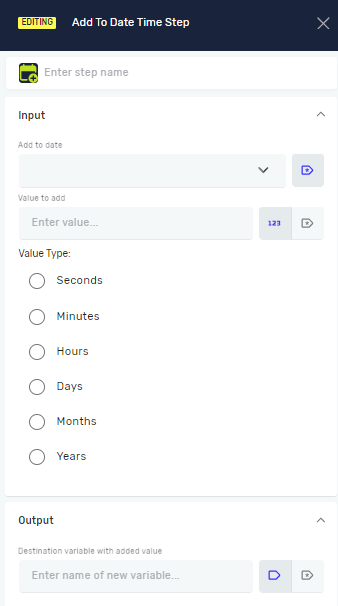
- Add to date: Pick an existing variable that holds the starting date and time. This variable needs to be a datetime type.
- Value to add: Type in the number you want to add. This can be a direct number or an existing integer variable.
- Value type: Choose the unit for the value you're adding. Pick one of these:
- Seconds
- Minutes
- Hours
- Days
- Months
- Years
Step 3: Set Up Output
- Destination variable with added value: Type the name of a new or existing variable. This variable will hold the new datetime value after the addition.
Parameters Explained
Step name (Optional)
- A custom name for the step.
- Example:
Add 5 Days to Due Date - Use it to make your steps easy to understand.
Add to date (Required)
- The existing variable with the starting datetime value.
- Example:
{{MyStartDate}} - This variable must be a datetime type.
Value to add (Required)
- The whole number to add to the date.
- Example:
5or{{NumberOfDays}} - This can be a number you type in or an integer variable.
Value type (Required)
- The unit of time for the value you're adding.
- Options:
Seconds,Minutes,Hours,Days,Months,Years - Choose the unit that matches your
Value to add.
Destination variable with added value (Required)
- The variable where the calculated datetime result will be saved.
- Example:
{{NewDueDate}} - You can make a new variable or change an existing one.
Related Articles
- Define Variable Step - Robotiq.ai Help Center
- Convert Text To Date Time Step
- Convert Date Time To Text Step
Need Help?
Can't find what you're looking for? Join the Robotiq Community to get help from other users and the Robotiq team.