
Role Based Access Control
Robotiq.ai uses Role-Based Access Control (RBAC) to manage who can do what and see what data. This makes sure users only interact with the data and processes that matter for their job.
How Robotiq.ai Handles Access
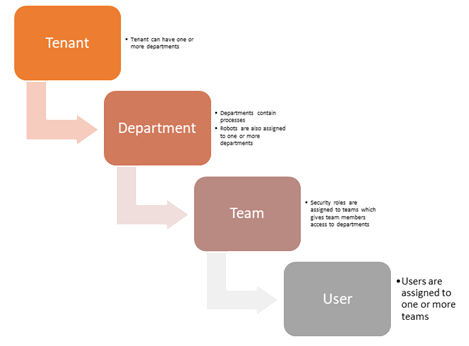
Robotiq.ai sets up access in a layered way:
Organization
An Organization is your whole company or business unit inside Robotiq.ai. All your data and users live within an Organization.
Departments
Organizations can have many Departments. Departments help you put similar processes and users together. For example, you could have a "Finance" Department, an "HR" Department, or a "Customer Support" Department.
Users and Teams
Users are put into Teams. Teams then get specific access rights within an Organization or Department.
- Organization Admin: A Team can have full control over the entire Organization.
- Department-Specific Roles: Teams can also have certain security roles for each Department.
Department Roles
Inside a Department, users can have one of two roles:
- Department Contributor: This role lets users work on processes in that Department.
- Department Admin: This role has more permissions than a Contributor. Department Admins can publish processes to test and production stages. They can also run processes in those stages.
Related Articles
Need Help?
Can't find what you're looking for? Join the Robotiq Community to get help from other users and the Robotiq team.