Find All Occurrences In Text Step
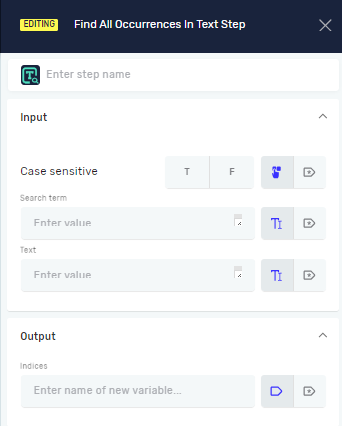
The Find All Occurrences In Text step looks through a text string for every time a specific search term appears. It gives you a list of the starting spots (indices) where the search term is located.
Use this step when you need to find every position of a word or phrase inside a longer piece of text.
How to Use Find All Occurrences In Text
Add this step to your process to find all matching parts within a text.
Step 1: Set Up the Search
- Drag and drop the Find All Occurrences In Text step into your workflow.
- Give it a Step name (optional) to help you find this step in your process.
- Set the Case sensitive parameter to
T(true) if you want the search to care about uppercase and lowercase letters, orF(false) if you don't. - Enter the Search term you want to find. This can be new text or a text variable you already have.
- Enter the Text you want to search within. This can be new text or a text variable you already have.
Step 2: Get the Results
- Create an Indices variable. This must be an
IntArraytype. - The step will put the starting positions of all found items into this
IntArrayvariable.
Parameters Explained
Step name (Optional)
- A name you choose for the process step. This helps you find the step in the editor.
Case sensitive (Required)
- This controls if the search looks for exact matches in terms of uppercase and lowercase letters.
T(true): The search will find "Robotiq" but not "robotiq".F(false): The search will find both "Robotiq" and "robotiq".- You can use an existing true/false variable for this setting.
Search term (Required)
- The exact text you want to find inside the main text.
- You can type in new text directly or use an existing text variable.
Text (Required)
- The larger text where the search will happen.
- You can type in new text directly or use an existing text variable.
Indices (Required)
- An existing or new variable that holds an array of integers (
IntArray). - This variable will store the starting position (index) of each time the search term shows up in the text.
Related Articles
Need Help?
Can't find what you're looking for? Join the Robotiq Community to get help from other users and the Robotiq team.