Index Of Text Step
Index Of Text Step - Robotiq.ai
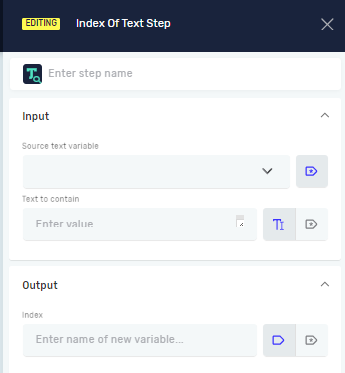
The Index Of Text Step finds where specific characters start within a text string. You use it to locate a particular piece of text inside a larger text.
How to Use Index Of Text Step
This step helps you find the exact position of characters within a text variable.
Add the Index Of Text Step
- Drag and drop the Index Of Text Step into your process flow.
- (Optional) In the Step name field, type a custom name for the step. This helps you tell it apart in your process.
Configure Input Parameters
Source text variable (Required)
- This is the text you want to search inside.
- Pick an existing variable that holds text.
- Example: A variable called
full_sentencethat says "The quick brown fox."
Text to contain (Required)
- This is the specific text you are looking for.
- Pick an existing variable or make a new one that holds text.
- Example: A variable called
search_wordthat says "quick".
Configure Output Parameters
Index (Required)
- This variable holds the starting position of the
Text to containwithin theSource text variable. - Pick an existing variable or make a new one that holds whole numbers.
- If the
Text to containis found, theIndexvariable will show where it starts (counting from 0). If it's not found, it will show -1. - Example: If
full_sentenceis "The quick brown fox." andsearch_wordis "quick", theIndexwill be 4.
Important: If the Text to contain shows up more than once in the Source text variable, this step only finds the first one. To find all of them, you need to use this step inside a loop, like a While Loop.
Related Articles
- Get Subtext Step - Pulls out a part of a text based on its starting point and length.
- Contains Text Step - Checks if a variable has certain text without telling you its position.
- Define Variable Step - Learn how to set up new variables for your processes.
Need Help?
Can't find what you're looking for? Join the Robotiq Community to get help from other users and the Robotiq team.