Get Subtext Step
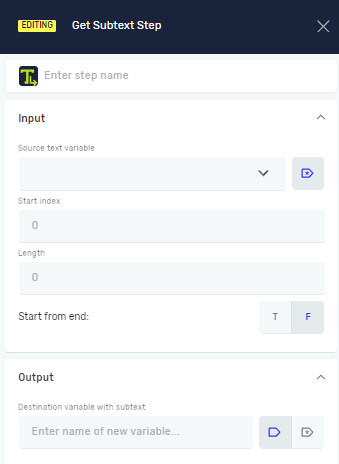
The Get Subtext step pulls out a piece of text from a longer string. You tell it where to start and how long the piece should be. This is handy for breaking down data or finding specific information in a text variable.
How to Use Get Subtext
Use this step to grab a specific part of a text string.
Step 1: Add the Get Subtext Step
- Drag the Get Subtext step into your process.
- (Optional) In the Step name field, give the step a custom name.
Step 2: Set Up Input Parameters
- In the Source text variable field, pick an existing text variable that holds the text you want to use.
- In the Start index field, type the character number where you want to begin taking text from.
- In the Length field, type how many characters you want to take.
- For Start from end, choose one of these:
- T (True): The Start index and Length will count from the end of the source text.
- F (False): The Start index and Length will count from the beginning of the source text (this is the default).
Step 3: Set Up Output
- In the Destination variable with subtext field, type a name for a new text variable or choose one that already exists. This variable will hold the text you pulled out.
Example: If Source text variable is ""Robotiq.ai Automation""
Start index: 9Length: 9Start from end: F (False) TheDestination variable with subtextwill be ""Automation"".
If Source text variable is ""Robotiq.ai Automation""
Start index: 10Length: 9Start from end: T (True) TheDestination variable with subtextwill be ""Automation"".
Parameters Explained
Step name (Optional)
- A custom name for this step in your process.
- Example: ""Extract Order ID""
- Use this to make your process easier to understand.
Source text variable (Required)
- The existing text variable that has the full text.
- Example:
myFullText - This is the text you will take a piece from.
Start index (Required)
- The character number where the subtext selection starts.
- Example:
5 - This can be a number you type in or an integer variable.
Length (Not required)
- How many characters to pick from the
Source text variable. - Example:
10 - This can be a number you type in or an integer variable.
- If the field is left empty, it will capture all remaining characters in the string.
Start from end (Required)
- Tells the system if
Start indexandLengthshould count from the beginning or end of the text.- T (True): Start counting from the end of the text.
- F (False): Start counting from the beginning of the text (default).
Destination variable with subtext (Required)
- The variable that will hold the text you pulled out.
- Example:
extractedPart - You can make a new variable or use an existing text variable.
Related Articles
Need Help?
Can't find what you're looking for? Join the Robotiq Community to get help from other users and the Robotiq team.