Folder Exists Step
The Folder Exists step checks if a specific folder path is on your system. This helps you run your workflow differently depending on if a folder is there or not.
How to Use the Folder Exists Step
Add this step to your process to see if a folder is present before doing anything else.
Step 1: Add the Folder Exists Step
- Open your process in the Robotiq.ai editor.
- Drag and drop the "Folder Exists" step into your workflow.
Step 2: Configure Input Parameters
- Select the "Folder Exists" step in your process.
- In the properties panel, find the "Input parameters" section.
Step 3: Configure Output Parameters
- In the properties panel, find the "Output parameters" section.
Parameters Explained
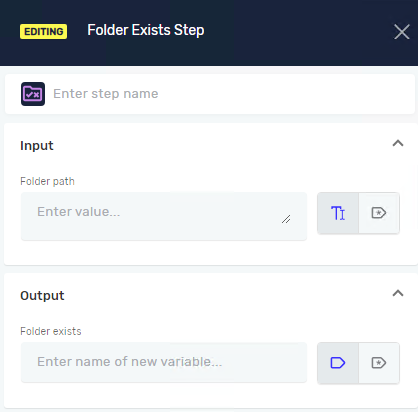
Step name (Optional)
- A custom name for this step in your process.
- Example:
Check for Reports Folder - Use this to make your process steps easier to understand.
Folder path (Required)
- The full path of the folder you want to check.
- Example:
C:\Users\YourName\Documents\Reports - You can use an existing string variable or type the path directly.
Folder Exists (Required)
- The name of a true/false variable that will store the result.
- Example:
isReportFolderPresent - If the folder exists, this variable will be
True. If it doesn't exist, it will beFalse.
Related Articles
- Create Folder Step - Robotiq.ai Help Center
- Delete Folder Step - Robotiq.ai Help Center
- File Exists Step - Robotiq.ai Help Center
- Set Variable Value Step - Robotiq.ai Help Center
Need Help?
Can't find what you're looking for? Join the Robotiq Community to get help from other users and the Robotiq team.