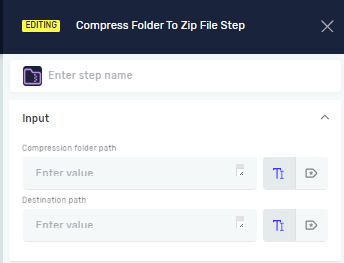
Compress Folder To Zip File Step
The Compress Folder to Zip File step makes a .zip archive from a folder you choose. You can use this step to put files together for storage, sending, or backup in your automated tasks.
How to Use the Compress Folder to Zip File Step
Add this step to your process to compress a folder into one .zip file.
Step 1: Add the Step to Your Process
- Drag and drop the Compress Folder to Zip File step into your workflow.
- Click the step to set up its properties.
Parameters Explained
Step Name (Optional)
- A custom name for the step. This helps you find the step in your process.
Compression File Path (Required)
- The full path to the folder you want to compress.
- You can type in a direct path or use a string variable you already have.
- Example:
C:\MyDocuments\ProjectFolder
Destination Path (Required)
- The full path where the new
.zipfile will be saved, including the.zipfile's name. - You can type in a direct path or use a string variable you already have.
- Example:
C:\Archives\ProjectArchive.zip
Related Articles
- Create Folder Step - Robotiq.ai Help Center
- Delete Folder Step - Robotiq.ai Help Center
- Set Variable Value Step - Robotiq.ai Help Center
Need Help?
Can't find what you're looking for? Join the Robotiq Community to get help from other users and the Robotiq team.