Write Variable Value To Excel Column In Loop Step
This step puts a variable's value into a specific Excel cell while a loop runs. Use it when you need to update an Excel column with data from a variable, one row at a time.
What You'll Need
- An Excel file you've already opened using the Open Excel File Step.
- An Excel Rows Loop Step set up in your process. This step must be placed inside the Excel Rows Loop Step.
- A variable that holds the value you want to write.
How to Use Write Variable Value To Excel Column In Loop Step
This step takes a variable's value and writes it to an Excel column for each row in your loop.
Step 1: Add the Step to Your Process
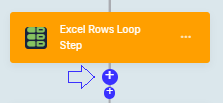
- Drag the "Write Variable Value To Excel Column In Loop Step" into your process.
- Put it inside an "Excel Rows Loop Step".
Step 2: Set Up the Step
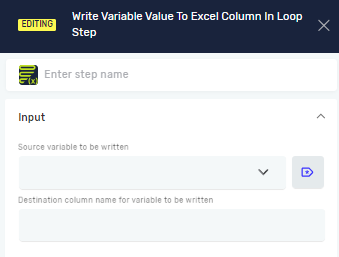
- Step name (Optional): Give the step a custom name. This helps you find it in your process.
- Source variable to be written (Required): Pick the variable that has the value you want to put into Excel.
- Destination column name for variable to be written (Required): Type the letter of the Excel column (like "A" or "B") where you want the value to go. You can also use a variable that contains the column letter.
Important: The "Excel Rows Loop Step" automatically handles which row to write to.
Parameter Details
Step name (Optional)
- A custom name for the step in your process.
- Example:
Write Order ID to Excel - Use it to make your process easier to understand.
Source variable to be written (Required)
- The name of a variable that already exists.
- This variable holds the value the step will write to Excel.
- Example:
myOrderID - Use it to say which data you're moving to Excel.
Destination column name for variable to be written (Required)
- The letter of the Excel column (like "C").
- You can also use a variable that stores the column letter.
- Example:
"B"orcolumnVariable - Use it to say where in the Excel sheet the variable's value will be written.
Additional comments
The Excel row index is defined in the ‘Excel Rows Loop Step’. This step can be only used if ‘Excel Rows Loop Step’ is previously defined and is a child of the ‘Excel Rows Loop Step’.
Related Articles
- Excel Rows Loop Step - Learn how to go through Excel rows.
- Open Excel File Step and Close Excel File Step - How to connect to and disconnect from Excel files.
- Write Value To Excel File Step - How to write one value to a specific Excel cell.
Need Help?
Can't find what you're looking for? Join the Robotiq Community to get help from other users and the Robotiq team.