Read Text From Pdf Step
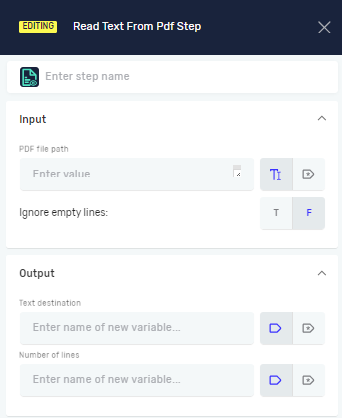
The Read Text From PDF step pulls all the text from a PDF file. You can use it to automatically get data out of documents.
How to Use Read Text From PDF
Add this step to your process to read text from a PDF file.
Step 1: Add the Read Text From PDF Step
- Open your process in the Robotiq.ai editor.
- Drag and drop the "Read Text From PDF" step into your workflow.
Step 2: Set Up Input Parameters
- PDF File Path: Type in the full path to the PDF file you want to read. You can use a variable you've already made or just type the path directly.
- Ignore Empty Lines: Pick
Trueif you don't want blank lines in the output. PickFalseto get all lines, even the empty ones.
Step 3: Set Up Output Parameters
- Text Destination: Give the name of an existing variable or make a new one. This variable will hold all the text pulled from the PDF.
- Number of Lines: Give the name of an existing variable or make a new one. This variable will hold the total number of lines found in the PDF.
Parameters Explained
Step Name (Optional)
- A custom name for this step in your process. This helps you find the step in the editor.
PDF File Path (Required)
- The full location of the PDF file.
- Example:
"C:\Documents\Report.pdf"or a variable likemyPdfPath. - Use this to tell the robot which PDF to read.
Ignore Empty Lines (Required)
- Controls if empty lines show up in the output.
- Values:
TrueorFalse. - Set to
Trueto get text that's easier to read, without blank lines.
Text Destination (Required)
- The variable that will store the text you pull out.
- Example:
pdfContent. - You can then use this variable in other steps, like a Set Variable Value Step.
Number of Lines (Required)
- The variable that will store how many lines are in the PDF.
- Example:
lineCount. - This is helpful if you need to go through the PDF content line by line or check how long it is.
Related Articles
- Read Text From File Step - Find out how to read text from
.txtor.cssfiles. - Define Variable Step - Learn how to make new variables for your extracted data.
Need Help?
Can't find what you're looking for? Join the Robotiq Community to get help from other users and the Robotiq team.