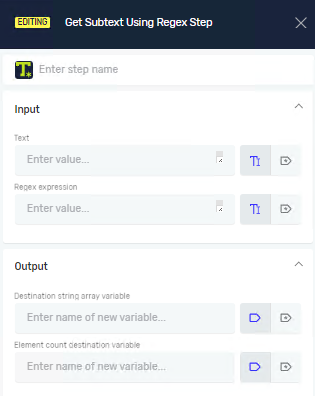
Get Subtext Using Regex Step
The Get Subtext Using Regex step pulls out specific text from a larger text string. It uses regular expressions (regex) to find and grab matching subtexts. Use this step when you need to find patterns in text, like email addresses, phone numbers, or specific codes.
How to Use Get Subtext Using Regex
This step finds all times a pattern shows up in your text and puts them in a list.
- Add the Step: Drag and drop the "Get Subtext Using Regex" step into your process.
- Set Up Parameters: Fill in the necessary input and output parameters.
Parameters Explained
Step Name (Optional)
- A custom name for this process step.
- Example:
Extract Emails
Text (Required)
- The text string where you want to look for subtexts.
- Example:
My contact is user@example.com.
Regex expression (Required)
- The regular expression pattern to search for in your text.
- Example:
[a-zA-Z0-9._%+-]+@[a-zA-Z0-9.-]+\.[a-zA-Z]{2,}(This regex finds email addresses.)
Destination string array variable (Required)
- A new or existing string array variable to hold all subtexts the regex finds.
- Example:
foundEmails - If the regex finds more than one match, each match becomes an item in this array.
Element count destination variable (Required)
- A new or existing integer variable to hold the total number of subtexts found.
- Example:
emailCount
Related Articles
- Get Subtext Step - Robotiq.ai Help Center
- Split Text Step - Robotiq.ai Help Center
- Parse Text Step - Robotiq.ai Help Center
Need Help?
Can't find what you're looking for? Join the Robotiq Community to get help from other users and the Robotiq team.