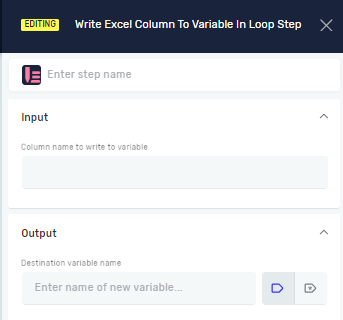
Write Excel Column To Variable In Loop Step
The "Write Excel Column To Variable In Loop Step" takes a value from a specific Excel cell and saves it into a variable. You use this step inside an "Excel Rows Loop Step" to work with data row by row.
What You'll Need
- An "Excel Rows Loop Step" already set up in your process. This step must be placed inside the loop.
- An open Excel file connection, usually set up with an "Open Excel File Step."
How to Use Write Excel Column To Variable In Loop Step
Use this step to pull data from an Excel column for each row as your loop runs.
Step 1: Add the Step to Your Process
- Drag the "Write Excel Column To Variable In Loop Step" into your process.
- Put it inside an "Excel Rows Loop Step."
Step 2: Set Up Input Parameters
- Step name (Optional): Give the step a name. This helps you find it in your process.
- Column name to write to variable (Required): Type the Excel column letter you want to read (like "A", "B", "C"). You can also use a variable that already holds the column letter.
Step 3: Set Up Output Parameters
- Destination variable name (Required): Give a name for the variable that will hold the Excel cell's value. You can use a variable you've already made or create a new one here.
Parameters Explained
Step name (Optional)
- A custom name for the step.
- Example:
Read Product ID - Use this to make your process easier to follow.
Column name to write to variable (Required)
- The letter of the Excel column to read.
- Example:
"A"ormyColumnVariable - This tells the system which column's data to get for the current row in the loop.
Destination variable name (Required)
- The name of the variable where the Excel cell's value will go.
- Example:
productID - This variable will hold the data from the chosen column for each row as the loop runs.
Related Articles
- Excel Rows Loop Step
- Open Excel File Step and Close Excel File Step
- Write Variable Value To Excel Column In Loop Step
Need Help?
Can't find what you're looking for? Join the Robotiq Community to get help from other users and the Robotiq team.