Clear List Step
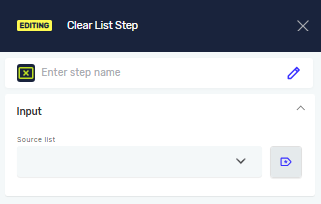
The Clear List step empties a list variable. Use this step to reset a list during a process.
How to Use the Clear List Step
Step 1: Add the Clear List Step
- Drag and drop the Clear List step into your process workflow.
Step 2: Configure the Source List
- Click on the Clear List step to open its properties.
- In the Source list variable field, type the name of the list variable you want to clear. This list must already exist in your process.
Important: After this step runs, the selected list variable will be empty.
Parameters Explained
Step Name (Optional)
- A custom name for the process step. This helps you find the step in your workflow.
- Example: "Clear_Temporary_Items"
Source list variable (Required)
- The name of an existing list variable. This list can hold numbers or text.
- The step removes all values from this list.
- Example:
myItemsList
Related Articles
Need Help?
Can't find what you're looking for? Join the Robotiq Community to get help from other users and the Robotiq team.