
KPI feature
The KPI feature in Robotiq.ai helps you track and report on important business numbers for your automated processes. You can set up your own KPIs to measure things like time saved, money saved, or specific business information.
How to Use the KPI Feature
You can create and change important business numbers right inside your processes.
Step 1: Create a KPI
- Decide on the specific number you want to track.
- Add the KPI directly to your process.
Important: You can use the KPI Step to put KPIs into your automation workflows.
Step 2: Get KPI Data
- Use the Robotiq.ai API to get your KPI data.
- Put this data into your reports or dashboard tools.
What You'll Need
- Access to the Robotiq.ai platform.
- You should know how to use API integrations to get data.
Examples of KPIs
You can track different kinds of data, like:
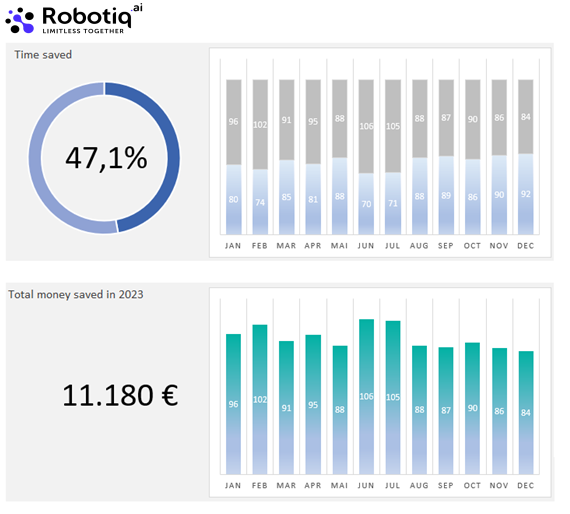
- Savings data:
- Time saved by automation
- Money saved by automation
- Robot work time
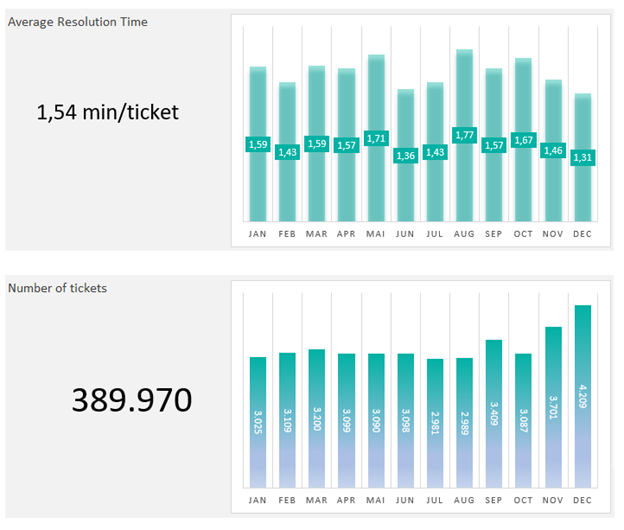
- Business data that matters:
- Number of loans processed
- Invoice amounts
- Average contract length
Related Articles
- KPI Step templates - Learn how to make templates for your KPIs.
- Reading KPI data - Find out how to get KPI values using the API.
- Add new application - Learn how to set up applications to get access tokens for API calls.
Need Help?
Can't find what you're looking for? Join the Robotiq Community to get help from other users and the Robotiq team.