Database Process Query Step
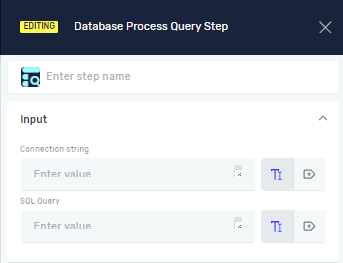
The Database Process Query step runs a database query. This step works for queries that don't return values, like INSERT, UPDATE, or DELETE statements.
What You'll Need
- Access to a database
- The right ODBC provider installed on the machine running the Robotiq.ai robot
How to Use the Database Process Query Step
This step runs a SQL query on a database you pick.
Step 1: Add the Database Process Query Step
- Open your process in the Robotiq.ai editor.
- Drag the Database Process Query step into your workflow.
Step 2: Set Up the Step
- Step name (Optional): Give this step a custom name. This name shows up on the step box in the editor.
- Connection string (Required): Give the connection string for your database. You can use an existing variable or type the string directly.
- SQL query (Required): Type the SQL query you want to run. You can use an existing variable or type the query directly.
Parameters Explained
Step name (Optional)
- A custom name for the process step.
- Example:
Update Customer Status - Use this to make your process steps easier to find.
Connection string (Required)
- This tells the system where your data is and how to connect.
- Example:
Provider=SQLOLEDB;Data Source=myServerAddress;Initial Catalog=myDataBase;User Id=myUsername;Password=myPassword; - This string tells Robotiq.ai how to link up with your database. It includes things like the database server, its name, and your login details.
SQL query (Required)
- This is the Structured Query Language (SQL) command to run.
- Example:
UPDATE Customers SET Status = 'Active' WHERE CustomerID = 123; - This is the actual command that does things like adding, changing, or deleting data in your database.
Important Things to Know About Connection Strings
A connection string is text that gives details about your data source and how to connect to it.
- Provider: The connection string includes the provider's name. You need to install the correct provider on the machine where the Robotiq.ai robot runs.
- ODBC Providers: For common data sources, you can find ODBC providers for:
- Microsoft SQL Server
- Oracle
- MySQL
- PostgreSQL
- MongoDB
Related Articles
Need Help?
Can't find what you're looking for? Join the Robotiq Community to get help from other users and the Robotiq team.