Create New List Step
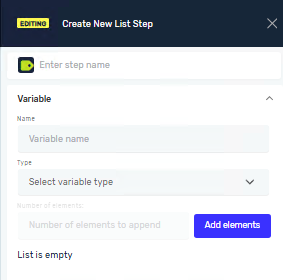
The Create New List Step lets you make a new list variable. You can create lists of strings or integers. This list can start empty, or you can add items to it right away.
How to Use the Create New List Step
Use this step to set up a new list variable in your automation process.
Step 1: Add the Create New List Step
- Drag and drop the "Create New List" step into your workflow.
- Click on the step to open its settings panel.
Step 2: Configure List Properties
Step Name (Optional)
- This is a custom name for the process step. It helps you find the step in the editor.
Input Parameters
Name (Required)
- This is the custom name for your new list variable.
- Important: Variable names have specific rules:
- They must start with a letter (a-z, A-Z) or an underscore (_).
- They cannot start with a number or other characters.
- They can only contain letters, digits (0-9), and underscores (_).
- They cannot contain spaces, hyphens (-), special characters, or punctuation.
- They cannot be a reserved keyword in Python or C#.
Type (Required)
- Select the type of items your list will hold from the dropdown menu.
- ListOfStrings: For lists containing text values.
- ListOfIntegers: For lists containing whole numbers.
Number of elements (Optional)
- Enter how many items you want in your list.
- If you create a
ListOfIntegers, these values cannot be empty.
Initial value (Optional)
- Add a starting value for the items in your list.
- The value must match the selected list type (integer or string).
- If you select
ListOfIntegers, you must provide an initial value if you specified a "Number of elements".
Options (Optional)
- For each item in the list, you can move it to a different spot or delete it.
Parameters Explained
Name (Required)
- The unique name for your list variable.
- Example:
myStringList,_integerValues - Use it to refer to the list in other steps.
Type (Required)
- Defines what kind of data the list will store.
- Options:
ListOfStrings,ListOfIntegers - Choose
ListOfStringsfor text data,ListOfIntegersfor numbers.
Number of elements (Optional)
- Sets how big the list is at the start.
- Example:
3will create a list with three items. - If creating a
ListOfIntegers, you must provide anInitial valuefor these items.
Initial value (Optional)
- The default value for each item when the list is created.
- Example: If
TypeisListOfStringsandInitial valueis"", all new items will be empty strings. - If
TypeisListOfIntegersandInitial valueis0, all new items will be0.
Keyword Restriction:
- The name cannot be a reserved keyword in Python or C#.
- Using a keyword as a variable name would cause syntax errors or unexpected behavior.
- Disallowed: Reserved Keywords (these keywords cannot be used as variable names):
- Python keywords: False, None, True, and, as, assert, async, await, break, class, continue, def, del, elif, else, except, finally, for, from, global, if, import, in, is, lambda, nonlocal, not, or, pass, raise, return, try, while, with, yield
- C# keywords: abstract, base, bool, byte, case, catch, char, checked, const, decimal, default, delegate, do, double, enum, event, explicit, extern, fixed, float, foreach, goto, implicit, int, interface, internal, lock, long, namespace, new, null, object, operator, out, override, params, private, protected, public, readonly, ref, sbyte, sealed, short, sizeof, stackalloc, static, string, struct, switch, this, throw, typeof, uint, ulong, unchecked, unsafe, ushort, using, virtual, void, volatile
Related Articles
Need Help?
Can't find what you're looking for? Join the Robotiq Community to get help from other users and the Robotiq team.