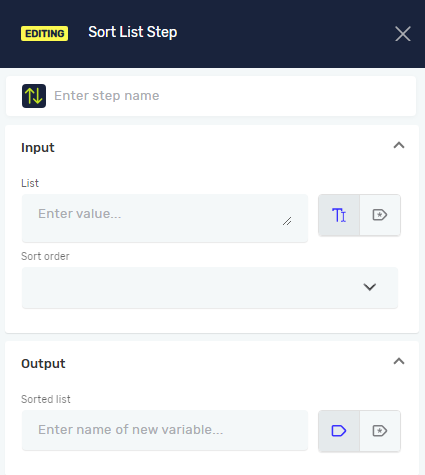
Sort List Step
The Sort List Step puts items in a list variable in order. You can sort lists from smallest to largest or largest to smallest. This helps get your data ready for other steps in your automation.
How to Use the Sort List Step
Add this step to your process to change the order of a list variable.
Step 1: Add the Sort List Step
- Drag the Sort List Step into your process workflow.
- (Optional) Give the step a custom name in the Step Name field.
Step 2: Set Up Input Parameters
- In the List field, pick a list variable you've already made. This list can have text or numbers.
- For Sort order, choose either Ascending or Descending.
Step 3: Set Up Output Parameter
- In the Sorted list field, type a variable name. You can use an existing variable or make a new one.
- This variable will hold the reordered list. It will be the same type of data (text or number array) as the original list.
Parameters Explained
Step Name (Optional)
- A custom name for this step in your process.
- This name shows up in the process editor.
List (Required)
- The name of the list variable you want to sort.
- This list must contain either text or numbers.
Sort order (Required)
- This controls how the list items are arranged.
- Choose Ascending to sort from lowest to highest (A-Z, 0-9).
- Choose Descending to sort from highest to lowest (Z-A, 9-0).
Sorted list (Required)
- The variable that will store the sorted list.
- You can pick an existing variable or create a new one.
- This variable's data type will match the input list (for example, a list of text or a list of numbers).
Related Articles
- Define Variable Step - Learn how to make new variables.
- Set Variable Value Step - See how to change values in existing variables.
Need Help?
Can't find what you're looking for? Join the Robotiq Community to get help from other users and the Robotiq team.