Convert Text To Date Time Step
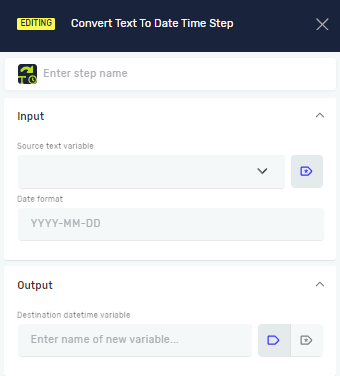
The Convert Text To Date Time step changes a text string into a date and time variable. You use this when you have date information as text and need to do things with dates, like calculations or formatting.
How to Use Convert Text To Date Time
This step takes a text variable and turns it into a date and time variable.
Step 1: Add the Convert Text To Date Time Step
- Drag and drop the "Convert Text To Date Time" step into your process.
Step 2: Set up the Step
- Step name (Optional): Give the step a custom name. This helps you find it in your process.
- Source text variable (Required): Pick an existing text variable that has the date and time text you want to change.
- Date format (Required): Type in the exact format of the date and time in your source text variable. For example, if your text is "2023-10-26 14:30:00", the format would be "yyyy-MM-dd HH:mm:ss".
- Destination datetime variable (Required): Choose an existing datetime variable or make a new one. This variable will hold the converted date and time.
What the Settings Mean
Step name (Optional)
- A custom name for this step in your process.
- Example:
Convert Order Date - Use it to make your process easier to understand.
Source text variable (Required)
- The text variable that contains the date and time as text.
- Example:
OrderDateText(whereOrderDateTextholds "12/25/2023") - You need to set up this variable before you use it here.
Date format (Required)
- The specific format of the date and time in your
Source text variable. - Example:
MM/dd/yyyyfor "12/25/2023" oryyyy-MM-dd HH:mm:ssfor "2023-10-26 14:30:00" - This format must exactly match the text you put in for it to convert correctly.
Destination datetime variable (Required)
- The datetime variable where the converted value will go.
- Example:
OrderDateTime - You can pick an existing datetime variable or create a new one right in this field.
Related Articles
Need Help?
Can't find what you're looking for? Join the Robotiq Community to get help from other users and the Robotiq team.