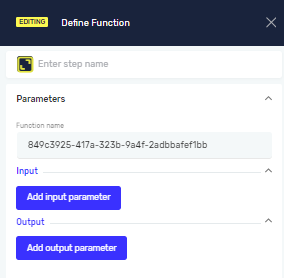
Define Function
The Define Function step lets you create local parameters for a Function. These parameters are only available within that specific Function in your process. Use this step to manage data flow inside your custom Functions.
How to Use Define Function
Use the Define Function step to set up input and output parameters for your custom Functions.
Step 1: Add the Define Function Step
- Drag and drop the Define Function step into your process workflow.
- (Optional) In the Step name field, enter a custom name for this step. This helps you identify it in your process.
Step 2: Add Parameters
- Select the Define Function step in your workflow.
- Add the input and output parameters your Function needs.
- Set up each parameter based on its role in the Function.
Parameters Explained
Step name (Optional)
- A custom name for the process step.
- Example: "Calculate_Total_Price_Function"
- Use this to give the step a clear, descriptive label in your process.
Input/Output Parameters (Required)
- These are the specific data points your Function will receive (input) or return (output).
- The exact parameters depend on what your Function does.
- Add as many input and output parameters as your Function needs to work correctly.
Related Articles
- Functions: Learn more about creating and using Functions in Robotiq.ai.
- Execute Function Step: Understand how to run your predefined Functions within a process.
- Define Variable Step: Learn how to declare and use variables in your processes.
Need Help?
Can't find what you're looking for? Join the Robotiq Community to get help from other users and the Robotiq team.