Read String From List Step
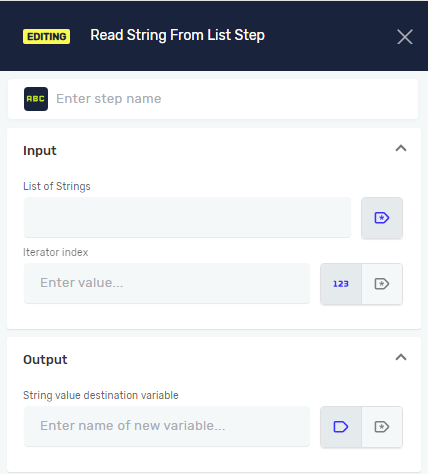
The Read String From List step pulls a specific string from a list of strings. It puts this string into a new or existing string variable. Use this step when you need to get an item from a certain spot in a list.
How to Use Read String From List
This step lets you take one string out of a list of strings by using its index number.
Step 1: Add the Read String From List Step
- Drag the Read String From List step into your process.
- (Optional) Give the step a different name in the Step name field.
Step 2: Set Up Input Parameters
List of Strings (Required)
- Pick an existing variable that is a "list of strings." This is the list you'll read from.
Iterator index (Required)
- Pick an existing variable that is an "integer." This variable should hold the index number of the string you want to get from the list.
- Important: List indexes usually start at 0. So, the first item is at index 0, the second at index 1, and so on.
Step 3: Set Up Output Parameter
String value destination variable (Required)
- Type the name for a new or existing variable. The string taken from the list will go here. This variable must be a "string" type.
Related Articles
- Define Variable Step - Robotiq.ai Help Center
- Set Variable Value Step - Robotiq.ai Help Center
- Add New Element To List Step
Need Help?
Can't find what you're looking for? Join the Robotiq Community to get help from other users and the Robotiq team.