Convert Text To Number Step
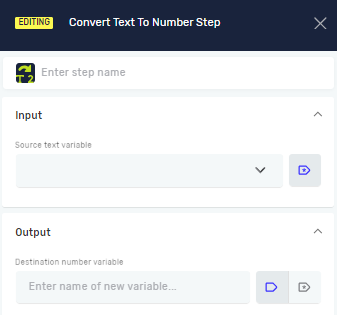
The Convert Text To Number step changes a text variable (a string) into a number variable. This is helpful when you get data as text but need to do math or compare numbers with it.
How to Use Convert Text To Number
Use this step to turn a string that holds a number into a number variable.
Step 1: Add the Step
- Drag the Convert Text To Number step into your process.
- Click on the step to open its settings.
Step 2: Set Up Input and Output
- In the Source text variable field, type the name of your existing string variable. This variable needs to contain a number as text (for example, "123" or "45.67").
- In the Destination number variable field, type a name for your new number variable. If a variable with this name already exists, its value will change.
Important: How numbers are formatted (like decimal points or thousands separators) depends on your computer's local settings. For instance, "1,234.56" might be read differently in places that use a comma for decimals.
Parameters Explained
Step name (Optional)
- A custom name for this step in your process.
- Example:
Convert Price to Number - Use this to make your process easier to understand.
Source text variable (Required)
- The name of the string variable you want to change.
- Example:
extractedPriceText - This variable must hold a value that can be read as a number.
Destination number variable (Required)
- The name of the number variable where the changed value will go.
- Example:
numericPrice - You can use an existing number variable or make a new one.
Related Articles
- Define Variable Step - Robotiq.ai Help Center: Learn how to create new variables.
- Convert Text To Date Time Step: Change text into a date and time variable.
- Convert Date Time To Text Step: Change a date and time variable into text.
Need Help?
Can't find what you're looking for? Join the Robotiq Community to get help from other users and the Robotiq team.