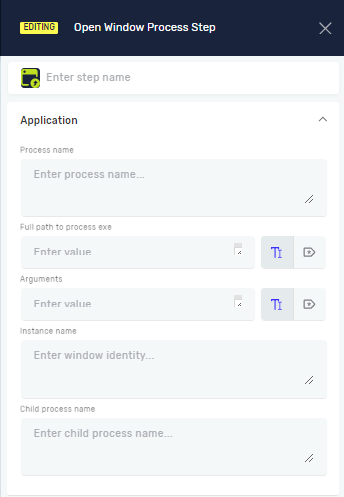
Open Window Process Step
The Open Window Process Step starts an application or program. You use it to launch the application your automation will work with. This step is necessary for any process that needs to open a desktop application.
How to Use the Open Window Process Step
You can add an Open Window Process Step by hand or automatically by recording.
Option 1: Add Automatically with Recording
When you record a process, Robotiq.ai automatically adds an "Open Window Step."
- Start recording your process.
- Click on the application you want to record.
- The recorder adds the "Open Window Step" with these details:
- Application name
- Application path
- Application instance name
Important: The Application Instance Name is the unique ID for that application. You must use this ID in all later steps that work with this application.
Option 2: Add Manually
- Drag and drop the "Open Window Process Step" into your workflow.
- Set up the step using the options below.
Parameters Explained
Step Name (Optional)
- A custom name for this process step.
- When to use it: Use this to make your process steps easier to understand in the editor.
Process Name (Optional)
- A custom name for the starting application instance or process higher up in the chain.
Exe Path (Required)
- The full file path to the application's executable file.
- Example:
C:\Program Files\MyApp\MyApp.exe - When to use it: Always give the exact location of the application you want to open.
Arguments (Optional)
- Any command-line arguments to send to the application when it starts.
- Example:
-param1 value -param2 - When to use it: Use this if the application needs specific startup settings.
Instance Name (Required)
- A unique name that identifies this application instance. Other steps use this name to connect to the application.
- Example:
MyApplicationInstance - When to use it: Give it a clear, descriptive name. If you change this name, update it in all other steps that use this instance.
Child Process Name (Optional)
- A custom name for the starting application instance or process lower down in the chain.
Related Articles
Need Help?
Can't find what you're looking for? Join the Robotiq Community to get help from other users and the Robotiq team.