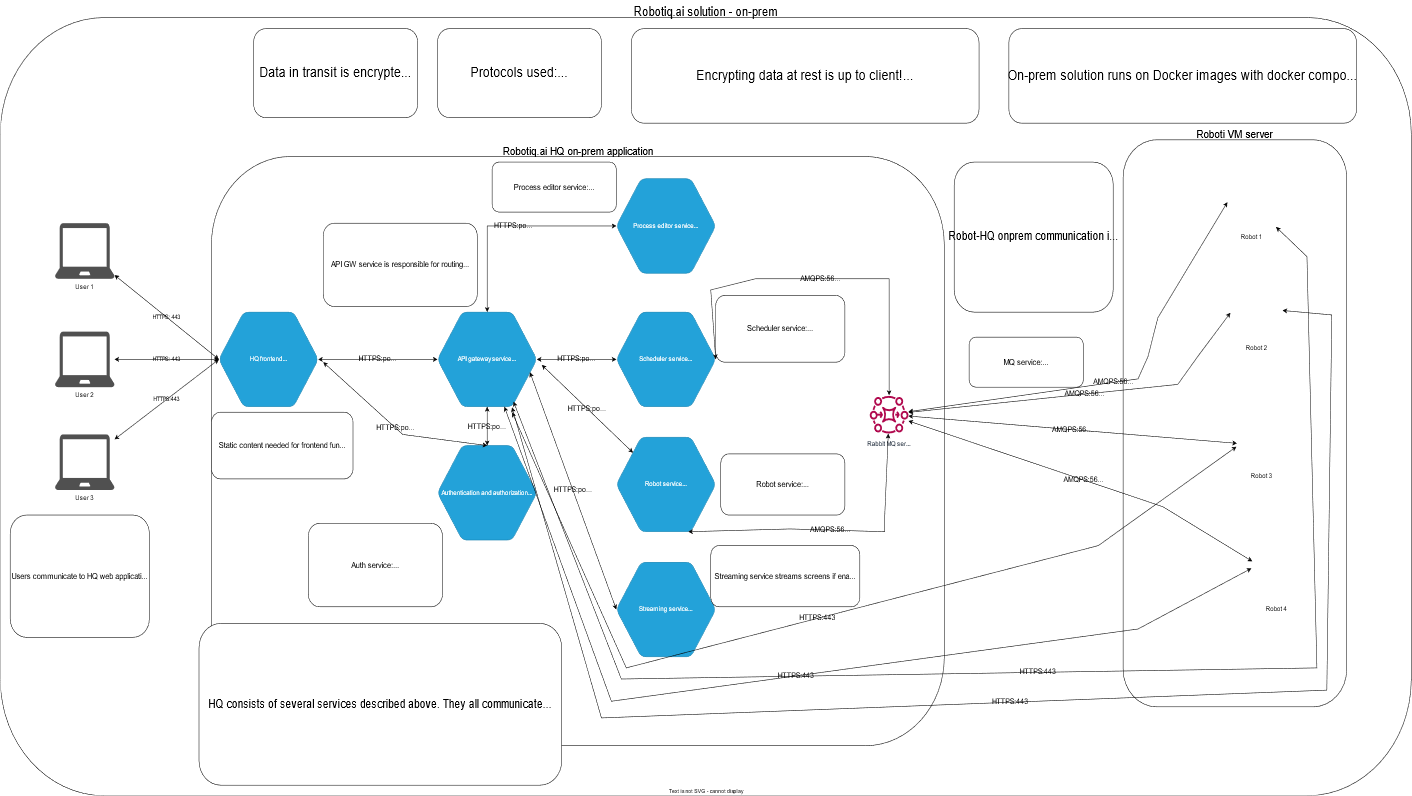
Robotiq.ai on-premise solution – Appendix to “Platform Overview”
The Robotiq.ai on-premise solution works just like the cloud-hosted platform. The main difference is how you set it up and run it. You use an on-premise solution when you need to put the Robotiq.ai Headquarters (HQ) application inside your own systems.
What You'll Need
- Access to your company's infrastructure team
- Docker Compose knowledge for setup
- The ability to manage a PostgreSQL database
Key Differences: Cloud vs. On-Premise
Robotiq.ai's main functions stay the same, but the on-premise solution works differently in a few ways:
Data Security
- Cloud: Uses Bring Your Own Key (BYOK) to encrypt data when it's not being used.
- On-Premise: Uses your PostgreSQL database. You are in charge of encrypting this database based on your setup.
Setup and Management
- Cloud: Robotiq.ai runs the HQ application using a Kubernetes cluster. Our team handles updates and new versions.
- On-Premise: You set up HQ services as Docker images using Docker Compose. Your infrastructure team handles installations, updates, and new versions. Robotiq.ai can help if you need it.
Robot Communication
- Default: Robots talk to HQ using AMQPS without needing a certificate sign-in or mTLS. This works well for local network setups.
- Customization: If your security rules require it, you can import certificates for each robot and turn on mTLS and AMQPS communication.
Service Certificates
- You provide and manage service certificates for HTTPS and AMQPS communication between services.
- Robotiq.ai provides environment variables. Your team uses these to put certificates where services can find them.
DNS Configuration
- Your infrastructure team must provide hostnames (DNS records) for the Frontend, Gateway, and Authentication services. This makes sure users can get to the HQ application.
New Releases
- Your infrastructure team gets access to the Robotiq.ai repository. This repository holds signed Docker images for HQ.
- You can download new images and install them by following instructions from the Robotiq.ai release management team.
Related Articles
Need Help?
Can't find what you're looking for? Join the Robotiq Community to get help from other users and the Robotiq team.