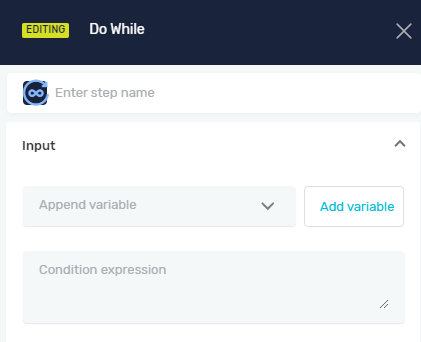
Do While
The Do While loop runs a block of code at least once. It then keeps running that block as long as a certain condition is true. Use this when you need to do something first, then check if you should keep doing it.
How to Use the Do While Loop
Add a Do While loop to your process to repeat actions based on a condition.
Step 1: Add the Do While Loop
- Drag and drop the Do While step into your process flow.
- Put the actions you want to repeat inside the Do While loop.
Step 2: Set Up Parameters
Set up how the loop behaves using the input parameters.
Parameters Explained
Step Name (Optional)
- A custom name for this step in your process. This helps you find the step in the editor.
- Example: "Retry Login"
Append variable (Optional)
- Pick a variable you set up earlier in your process.
- The loop can use this variable in its condition or change it while the loop runs.
- When to use it: To count how many times the loop runs or to change data that affects when the loop stops.
Condition expression (Required)
- A true/false statement that decides if the loop should keep going.
- The loop repeats as long as this condition is true.
- Example:
counter < 5(The loop keeps going as long as thecountervariable is less than 5). - When to use it: To control how many times the loop runs or to stop it when something specific happens.
Related Articles
- While Loop - Robotiq.ai Help Center
- For Each Loop - Robotiq.ai Help Center
- Define Variable Step - Robotiq.ai Help Center
Need Help?
Can't find what you're looking for? Join the Robotiq Community to get help from other users and the Robotiq team.