Datatable Read Step
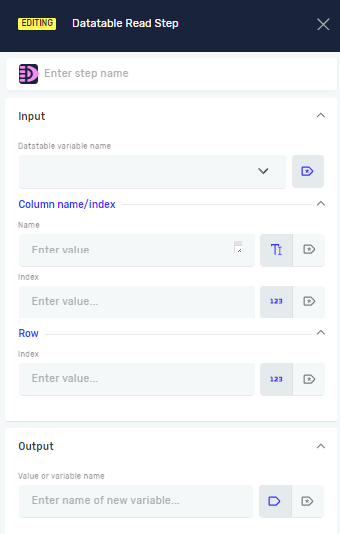
The Datatable Read Step gets a specific value from a Datatable variable. You can get the value from a particular column and row. This step puts the value it finds into a new or existing variable.
How to Use Datatable Read Step
Use this step to pull data from a Datatable. You can pick the exact cell you want to read.
Step 1: Add the Datatable Read Step
- Drag and drop the Datatable Read Step into your process.
- (Optional) Give it a Step name to help you find it later.
Step 2: Set Up Input Parameters
- Choose the Datatable variable name. This is the Datatable you want to read from.
- Pick the column to read from. You can use either:
- Column Name: Type the column's name as text or use an existing variable that holds the column name.
- Column Index: Type the column's number (starting from 0) or use an existing variable.
- Important: You must choose either Column Name or Column Index, but not both.
- Type the Row Index. This is the row's number (starting from 0) or an existing variable.
Step 3: Set Up Output Variable
- Type the Value or variable name. This is the name of the variable where the data you read will go. This variable will be text.
Parameters Explained
Step name (Optional)
- A name you choose for this step.
- Example:
Read User Email - Helps keep your workflow organized.
Datatable variable name (Required)
- The name of the Datatable variable you want to get data from.
- Example:
myUserData - This Datatable must already be in your process.
Column Name (Required if Column Index is not defined)
- The name of the column you want to read.
- Example:
"Email"oremailColumnVar - Use this if you know the column's header.
Column Index (Required if Column Name is not defined)
- The column's number, starting from zero.
- Example:
2orcolumnIndexVar - Use this if you know the column's position.
Row Index (Required)
- The row's number, starting from zero.
- Example:
0(for the first row) orcurrentRowIndex - This tells the step which row's data to get.
Value or variable name (Required)
- The name of the variable that will hold the value read from the Datatable.
- Example:
extractedEmail - This variable will be text.
Related Articles
- Define Variable Step - Robotiq.ai Help Center
- Write Value To Data Table Step
- Save Table Selenium Step - Robotiq.ai Help Center
Need Help?
Can't find what you're looking for? Join the Robotiq Community to get help from other users and the Robotiq team.