Loop Number Of Times Step
The Loop Number Of Times step repeats a part of your process a specific number of times. You can use it to automate tasks that happen over and over, like going through many items in a list.
How to Use the Loop Number Of Times Step
Add this step to your process to make a loop. Any steps you put inside this loop will run each time the loop goes through.
Step 1: Add the Loop Number Of Times Step
- Open your process in the editor.
- Drag the Loop Number Of Times step into your workflow.
Step 2: Set up the Loop
- Click on the Loop Number Of Times step to open its settings.
- Give the step a custom name in the Step Name field (this is optional).
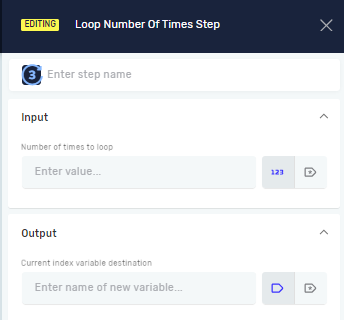
- Set up the input and output details.
Parameters Explained
Step Name (Optional)
- This is a custom name for the process step.
- It labels the step box in the editor.
Number of times to loop (Required)
- This tells the loop how many times to run.
- You can use an existing whole number variable or just type in a number.
- Example: If you set this to
5, the steps inside the loop will run five times.
Current index variable destination (Required)
- This is where the number for the current loop run is saved.
- You can use an existing whole number variable or make a new one.
- The number starts at
0for the first run, then1, and so on. - Example: If you name this variable
loopIndex,loopIndexwill be0during the first run,1during the second, and so on.
Related Articles
- Define Variable Step - Robotiq.ai Help Center
- Set Variable Value Step - Robotiq.ai Help Center
- Next Loop Iteration Step - Robotiq.ai Help Center
Need Help?
Can't find what you're looking for? Join the Robotiq Community to get help from other users and the Robotiq team.