Convert Number To Text Step
The Convert Number To Text step changes a number variable into a text variable. You use it when you need to show a number as text or mix it with other text.
How to Use Convert Number To Text
This step takes a number and turns it into a text variable.
Step 1: Add the Convert Number To Text Step
- Drag and drop the Convert Number To Text step into your process.
Step 2: Configure the Step
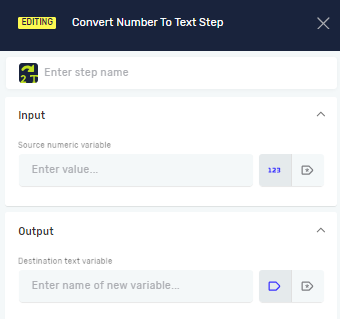
- Step name (Optional): Give the step a custom name. This helps you find it in your process.
- Source numeric variable (Required): Pick the variable that holds the number you want to change. This variable must be a number type.
- Destination text variable (Required): Type the name for the new or existing text variable. This variable will hold the number after it's turned into text.
Important: How numbers are formatted, like decimal and thousands separators, depends on your machine's local settings.
Parameters Explained
Step name (Optional)
- This is a custom name for the process step.
- It labels the step box in the editor.
Source numeric variable (Required)
- This is the name of an existing variable.
- It must be a number type.
- It contains the number you want to change.
Destination text variable (Required)
- This is the name for a new or existing variable.
- It must be a text type.
- It will hold the number after it's changed to text.
Related Articles
- Convert Text To Number Step: Learn how to change text back into a number.
- Define Variable Step: See how to create new variables in your process.
- Set Variable Value Step: Learn how to change what's in existing variables.
Need Help?
Can't find what you're looking for? Join the Robotiq Community to get help from other users and the Robotiq team.