Copy Clipboard To Variable Step
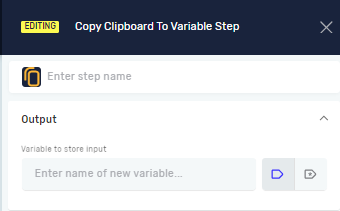
The Copy Clipboard To Variable step takes the text from your computer's clipboard and puts it into a variable in your Robotiq.ai process. This means you can use whatever was on the clipboard later in your automation.
You'd use this step when you need to grab text a user has copied or text another program has put on the clipboard.
How to Use Copy Clipboard To Variable
Step 1: Add the Step to Your Process
- Open your process in the Robotiq.ai editor.
- Drag the Copy Clipboard To Variable step into your workflow.
Step 2: Set Up the Variable
- Click on the Copy Clipboard To Variable step to open its settings.
- In the Variable to store input field, type the name of the variable where you want to save the clipboard content.
- You can use a variable you've already made or create a new one.
- The variable needs to be a string (text) type.
Parameters Explained
Step name (Optional)
- A custom name for this step in your process.
- This name shows up on the step box in the editor.
Variable to store input (Required)
- The name of the variable that will hold the text copied from the clipboard.
- The variable must be a string type.
- Example:
clipboardText - When to use it: Always pick a variable to store the clipboard content.
Related Articles
- Paste To Clipboard Step - Robotiq.ai Help Center
- Define Variable Step - Robotiq.ai Help Center
- Set Variable Value Step - Robotiq.ai Help Center
Need Help?
Can't find what you're looking for? Join the Robotiq Community to get help from other users and the Robotiq team.