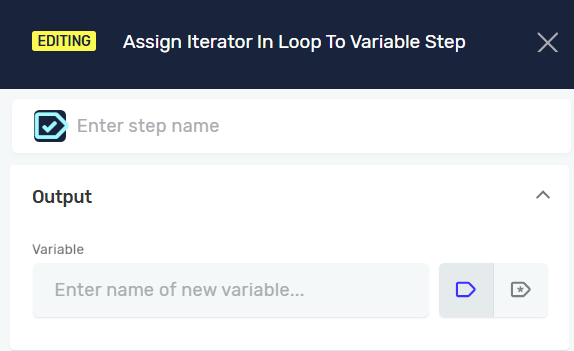
Assign Iterator In Loop To Variable Step
The Assign Iterator In Loop To Variable step saves the current iteration number of a loop to a variable. This helps you track how many times a loop has run.
How to Use Assign Iterator In Loop To Variable
Use this step inside a loop to store the current loop count.
Step 1: Add the Step to Your Process
- Drag and drop the Assign Iterator In Loop To Variable step into your process workflow.
- Place it inside a loop structure.
Step 2: Configure the Variable
- In the step's properties, find the Variable field.
- Enter the name of an existing integer variable.
- If the variable does not exist, Robotiq.ai will create a new integer variable with that name.
Important: This step only works within a loop.
Parameters Explained
Step Name (Optional)
- A custom name for this specific step in your process.
- This helps you identify the step in the workflow editor.
Variable (Required)
- The name of the variable that will store the loop's current iteration number.
- This variable must be an integer data type.
- Example:
loopCounter - Use this variable later in your process to reference the loop's progress.
Related Articles
- Set Variable Value Step - Robotiq.ai Help Center
- Define Variable Step - Robotiq.ai Help Center
- Next Loop Iteration Step - Robotiq.ai Help Center
Need Help?
Can't find what you're looking for? Join the Robotiq Community to get help from other users and the Robotiq team.