For Each Loop
The For Each Loop step runs a block of code for each item in a list. You use it to process every item in an array or collection.
How to Use the For Each Loop
Use this step to automate tasks that repeat for each item in a given list.
Step 1: Add the For Each Loop Step
- Drag and drop the For Each Loop step into your process flow.
- Put the steps you want to repeat inside the For Each Loop block.
Step 2: Set Up Input Parameters
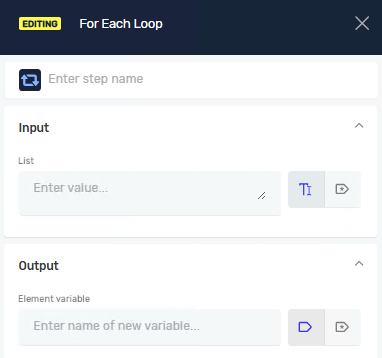
Set up the loop to say which list to go through and where to put each item.
Parameters Explained
Step name (Optional)
- A custom name for the process step. This helps you find the step in the Process Editor.
List (Required)
- The name of an existing variable that holds an array or list of items. The loop will process each item in this list.
- Example:
myArrayOfNames - When to use it: Always tell it which list you want to go through.
Element variable (Required)
- The name of a variable where the current item from the list will be stored each time the loop runs.
- Example:
currentItem - When to use it: Use this variable inside the loop to work with one item at a time.
Related Articles
- While Loop - Robotiq.ai Help Center
- Do While - Robotiq.ai Help Center
- Set Variable Value Step - Robotiq.ai Help Center
Need Help?
Can't find what you're looking for? Join the Robotiq Community to get help from other users and the Robotiq team.