Get Excel Row and Column Count Step
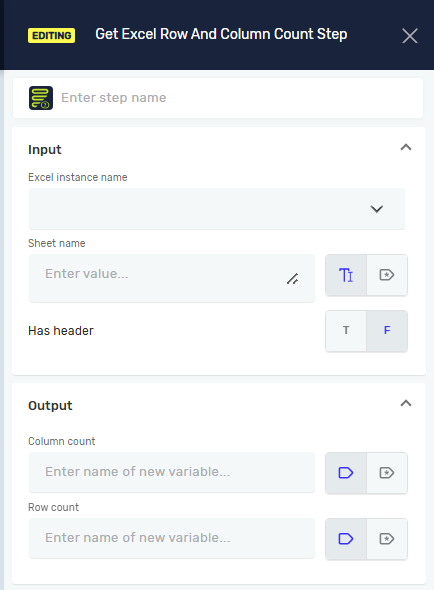
The Get Excel Row and Column Count step tells you how many rows and columns are in a specific Excel sheet. You can use this step to change your automation based on how big your Excel data is.
What You'll Need
- An open Excel file connection, made with the Open Excel File Step.
How to Use Get Excel Row and Column Count
Add this step to your process to count the rows and columns in an Excel sheet.
Step 1: Add the Get Excel Row and Column Count Step
- Drag and drop the Get Excel Row and Column Count step into your workflow.
- (Optional) Give it a Step name to label it in your process.
Step 2: Configure Input Parameters
- Excel instance name: Type the name of your Excel connection. This is the same name you used in the Open Excel File Step.
- Sheet name: Type the name of the Excel sheet you want to count. You can also use a variable that holds the sheet name.
- Has custom columns: Choose
Tif your Excel sheet has header columns. ChooseFif it does not (this is the default).
Step 3: Define Output Variables
- Column count: Type the name of a new or existing integer variable. The step will put the total number of columns in this variable.
- Row count: Type the name of a new or existing integer variable. The step will put the total number of rows in this variable.
Parameters Explained
Step name (Optional)
- A custom name for this step in your process.
Excel instance name (Required)
- The unique name of the Excel connection. This must match the name from your Open Excel File Step.
- Example:
myExcelConnection
Sheet name (Required)
- The name of the Excel sheet to count.
- Example:
"Sheet1"or a variable likemySheetName
Has custom columns (Required)
T(True): Your sheet has a header row.F(False): Your sheet does not have a header row. This is the default setting.
Column count (Required)
- The name of an integer variable to store the total number of columns found.
- Example:
totalColumns
Row count (Required)
- The name of an integer variable to store the total number of rows found.
- Example:
totalRows
Related Articles
Need Help?
Can't find what you're looking for? Join the Robotiq Community to get help from other users and the Robotiq team.