Get Folders In Folder Step
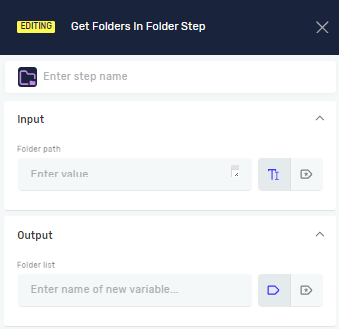
The Get Folders In Folder Step finds all subfolders inside a specific folder. It saves these subfolder paths into a list of text variables. Use this step when you need a list of subfolders for your automation.
How to Use Get Folders In Folder Step
This step helps you get a list of subfolders from a certain directory.
Step 1: Add the Get Folders In Folder Step
- Drag and drop the Get Folders In Folder Step into your process.
- (Optional) In the step's settings, you can change the Step name to make your process easier to read.
Step 2: Configure Input Parameters
Folder Path (Required)
- Type the full path to the folder you want to check for subfolders.
- You can use an existing text variable or type the path directly.
- Example:
C:\MyDocuments\Projectsor a variable namedprojectFolderPath.
Step 3: Configure Output Parameters
Folder list (Required)
- Pick a variable to hold the list of subfolder paths.
- This variable must be an "Array of strings" type.
- You can choose an existing variable or make a new one.
- The step will fill this variable with the full paths of all subfolders it finds.
Parameters Explained
Step name (Optional)
- A custom name for this step in your workflow.
- It helps you quickly see what the step does.
Folder Path (Required)
- What it does: Tells the system which folder to look in for subfolders.
- Example value:
"C:\Data\Reports"ormyRootFolderVariable. - When to use it: Always give the complete path to the main folder.
Folder list (Required)
- What it does: Saves the step's result as a list of subfolder paths.
- Example value:
["C:\Data\Reports\Q1", "C:\Data\Reports\Q2"]. - When to use it: Use this variable in later steps that need to work with individual subfolders.
Related Articles
- Get Files In Folder Step - Learn how to get a list of files from a folder.
- Create Folder Step - Learn how to make new folders.
- Folder Exists Step - Check if a folder is there before doing anything with it.
Need Help?
Can't find what you're looking for? Join the Robotiq Community to get help from other users and the Robotiq team.