
Script Step
The Script step lets you write custom C# code to automate things Robotiq.ai's built-in steps don't cover. This step is for advanced users who need to write specific logic or use C# libraries.
What You'll Need
- Basic C# programming skills.
- How to use process variables in Robotiq.ai.
How to Use the Script Step
Use the Script step when you need to write custom code for your automation.
Step 1: Add the Script Step
- Drag the Script step into your process flow.
- (Optional) Give it a Step Name to label the step in the editor.
Step 2: Define Input Variables
- In the script editor, pick an existing process variable from the input field.
- Click Add variable. This puts the variable in the left window, where you'll write your C# code.
- Add any other input variables your script needs.
Step 3: Write Your C# Code
- Write your C# code in the script editor.
- Write the algorithm your script will run.
- Define any output variables your script will create.
Important: The Script step only works with C# libraries that come with the robot application.
Parameters Explained
Step Name (Optional)
- A custom name for the step.
- Example: "Calculate Discount"
- Use this to make your process flow easier to understand.
Common Issues
Problem: External libraries or older .NET assemblies don't work. Solution: The Script step doesn't work well with all external libraries. Try using the Python Script Step if you need to use your own Python version and other libraries.
Problem: Problems come up because of code users write. Solution: Robotiq.ai doesn't support issues caused by custom user code. Follow good coding practices and test your code well before using it.
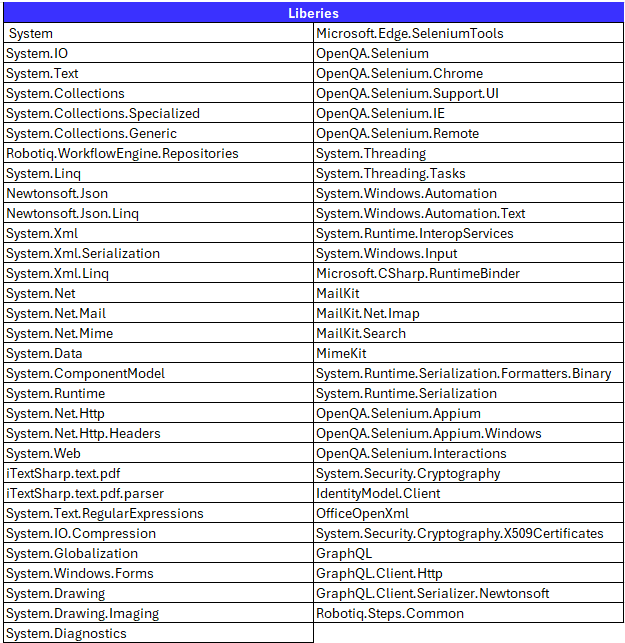
The basic concept of using this feature is:
- Defining input variables
- Defining algorithm
- Defining output variables

Please be advised that Robotiq.ai team assumes no responsibility for any code created within the script step. However, to ensure that your code is safe and secure, we recommend that you follow industry best practices and thoroughly test your code before deploying it.
NOTE: Avoid using any classes from IdentityModel.Client, as the package is deprecated and no longer maintained.
Related Articles
- Python Script Step - Learn how to write scripts in Python.
- Define Variable Step - Learn how to create new variables.
- Best Practices - Make sure your process is easy to read, reliable, and follows development rules.
Need Help?
Can't find what you're looking for? Join the Robotiq Community to get help from other users and the Robotiq team.