Parse Text Step
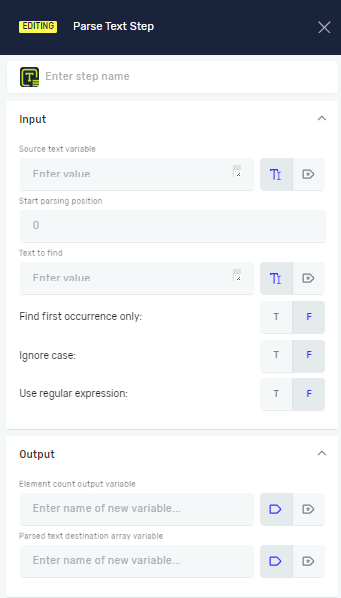
The Parse Text step finds specific text inside a bigger string. It gives you a list of the starting spots (indexes) where the text shows up. Use this step to find text patterns or certain words in any string variable.
How to Use Parse Text
Add the Parse Text step to your process to look for text within a string.
Step 1: Add the Parse Text Step
- Open your process in the Process Editor.
- Drag the Parse Text step from the Text section of the Steps panel onto your canvas.
Step 2: Set Up Input Parameters
Set up the step to tell it what text to look for and where to look.
Source text variable (Required)
- The string variable that holds the text you want to search.
- Example:
myDocumentContent
Start parsing position (Required)
- The character number in the
Source text variablewhere the search should begin. - Example:
0(to start from the beginning of the string)
Text to find (Required)
- The text or regular expression you want to find inside the
Source text variable. - This can be a direct value or an existing variable.
- Example:
"invoice number"orinvoicePattern
Find first occurrence only (Required)
- Choose if you want to find only the first match or all matches.
- T (True): Finds only the first time it appears.
- F (False): Finds every time it appears (this is the default).
Ignore case (Required)
- Choose if the search should care about uppercase or lowercase letters.
- T (True): Ignores case during the search (e.g., "Text" matches "text").
- F (False): The search cares about case (this is the default).
Use regular expression (Required)
- Choose if the
Text to findis a regular expression.- T (True): Treats
Text to findas a regular expression. - F (False): Treats
Text to findas plain text (this is the default).
- T (True): Treats
Step 3: Set Up Output Parameters
Set up the step to save the search results.
Element Count Output variable (Required)
- An existing or new integer variable. This variable will hold the total number of times the
Text to findwas found. - Example:
foundCount
Parsed text destination array variable (Required)
- An existing or new array of integers variable. This variable will hold the starting index positions of each time the text was found.
- Example:
foundPositions
Related Articles
Need Help?
Can't find what you're looking for? Join the Robotiq Community to get help from other users and the Robotiq team.