Delete Duplicate List Values Step
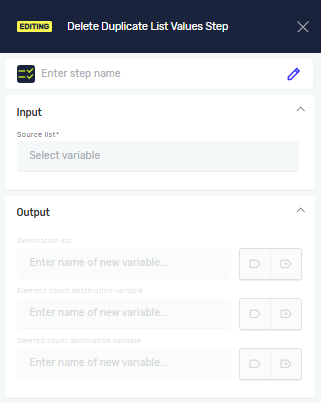
The Delete Duplicate List Values step gets rid of all duplicate entries in a list variable. This helps you make a clean list of unique values.
How to Use Delete Duplicate List Values
Add this step to your process to clean up a list by removing any repeated values.
Step 1: Add the Step
- Drag and drop the Delete Duplicate List Values step into your process.
- (Optional) In the Step Name field, type a custom name for the step.
Step 2: Set Up Input Parameters
- For Source list variable, pick an existing list variable that has the values you want to clean.
- If your source list variable is a
ListOfStringdata type, you will see the Ignore case toggle:- Set to T (True) to ignore whether letters are capitalized when checking for duplicates (for example, "Apple" and "apple" count as the same). This is the default setting.
- Set to F (False) to treat "Apple" and "apple" as different values.
Step 3: Set Up Output Parameters
- For Destination list variable, pick an existing list variable or make a new one. This variable will hold the list with all duplicate values removed.
- For Element count destination variable, pick an existing integer variable or make a new one. This variable will hold the total number of unique items in the destination list.
- For Deleted count, pick an existing integer variable or make a new one. This variable will hold the total number of duplicate items that were removed.
Parameters Explained
Step Name (Optional)
- A custom name for this step in your process.
- Example:
Remove Duplicate Product IDs - Use this to make your process easier to understand.
Source list variable (Required)
- The list variable you want to work with.
- Example:
myProductList - This list will be checked for duplicate values.
Ignore case (Required for ListOfString variables)
- This setting controls if the step should care about capitalization when finding duplicates.
T(True): Ignores capitalization (e.g., "Text" and "text" are duplicates).F(False): Considers capitalization (e.g., "Text" and "text" are not duplicates).- This setting only shows up if your Source list variable is a
ListOfStringtype.
Destination list variable (Required)
- The list variable where the unique values will go.
- Example:
uniqueProductList - This variable will contain the original list's values, but with all duplicates gone.
Element count destination variable (Required)
- An integer variable that will store the number of items in the
Destination list variable. - Example:
uniqueProductCount - This gives you the total number of unique items.
Deleted count (Required)
- An integer variable that will store the number of duplicate items removed from the
Source list variable. - Example:
duplicatesRemoved - This tells you how many duplicate items were found and deleted.
Related Articles
Need Help?
Can't find what you're looking for? Join the Robotiq Community to get help from other users and the Robotiq team.