Truncate Number Step
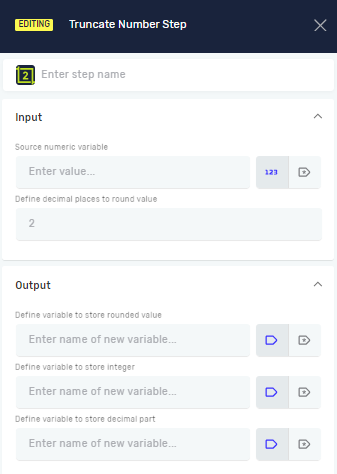
The Truncate Number step rounds a decimal number. You can round it to a certain number of decimal places or turn it into a whole number. This helps make numerical data consistent in your automation processes.
How to Use the Truncate Number Step
Use this step to round a decimal value and save the result.
Step 1: Add the Truncate Number Step
- Open your process in the Robotiq.ai Process Editor.
- Drag the Truncate Number step into your workflow.
Step 2: Set Up Input Parameters
- Step name (Optional): Give this step a custom name. This helps you find it in your process.
- Source numeric variable (Required): Pick an existing variable that holds the decimal number you want to round. This variable must be a decimal type.
- Define decimal places to round value (Required): Type in how many decimal places you want to keep. For example, type
2to round to two decimal places.
Step 3: Set Up Output Parameters
- Define variable to store rounded value (Required): Pick an existing variable or make a new one to save the rounded decimal number. This variable must be a decimal type.
- Define variable to store integer (Optional): Pick an existing variable or make a new one to save only the whole number part of the rounded number.
- Define variable to store decimal part (Optional): Pick an existing variable or make a new one to save only the decimal part of the rounded number.
Parameters Explained
Step name (Optional)
- A custom name for the step in the process editor.
- Example:
Round_Order_Total - Use this to make your process steps clear.
Source numeric variable (Required)
- The variable that has the decimal number you want to round.
- Example:
OrderTotal(must be a decimal type) - This is the number you're rounding.
Define decimal places to round value (Required)
- How many decimal places you want in the rounded number.
- Example:
2(rounds to two decimal places like 12.34) - Set this to
0to get a whole number.
Define variable to store rounded value (Required)
- The variable where the main rounded decimal result will be saved.
- Example:
RoundedOrderTotal(must be a decimal type) - This variable will hold the number after rounding.
Define variable to store integer (Optional)
- The variable where only the whole number part of the rounded number will be saved.
- Example:
OrderTotalInteger - Use this if you need just the whole number.
Define variable to store decimal part (Optional)
- The variable where only the decimal part of the rounded number will be saved.
- Example:
OrderTotalDecimal - Use this if you need just the fractional part.
Related Articles
- Define Variable Step - Learn how to make new variables for your process.
- Set Variable Value Step - Learn how to change existing variable values.
- Increase Decrease Variable Step - Learn how to add to or subtract from numeric variables.
Need Help?
Can't find what you're looking for? Join the Robotiq Community to get help from other users and the Robotiq team.