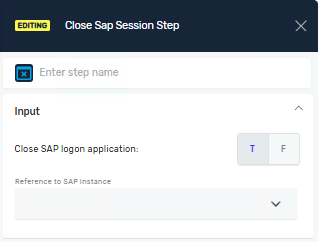
Close Sap Session Step
The Close SAP Session Step ends an active SAP session. Use it to close the connection to an SAP system and free up its resources. This step helps your SAP automation processes run well.
How to Use the Close SAP Session Step
Put this step at the end of your SAP automation sequence. It properly closes the SAP session.
Step 1: Add the Close SAP Session Step
- Drag and drop the "Close SAP Session Step" into your process.
Step 2: Set Up the Step Parameters
- Set the input parameters for the step.
Parameters Explained
Step name (Optional)
- A custom name for this process step.
- This name shows up on the editor's process step box.
Close SAP logon application (Required)
- This button closes the SAP Logon application along with all active sessions.
- T (true): Closes SAP Logon and all sessions. This is the default setting.
- F (false): Closes only the active SAP session, leaving SAP Logon open.
Reference to SAP instance (Required)
- This tells the system which active SAP session you want to close.
- This value must be the same as the reference you used when you opened the session with the Open SAP Session Step.
Important Things to Remember
- Always use the same SAP reference value you set when the session started.
- Closing the SAP session stops resource leaks.
- It makes sure that later automation steps can start a new, clean session without problems.
Related Articles
- Open SAP Session Step - Learn how to open an SAP session.
- Terminate Window Application Step - Kill other window applications.
Need Help?
Can't find what you're looking for? Join the Robotiq Community to get help from other users and the Robotiq team.