Open Sap Session Step
The Open SAP Session step starts the SAP Logon process. It connects to a specific SAP system and logs in with user credentials. Use this step to begin any SAP automation.
How to Use the Open SAP Session Step
This step opens an SAP session and gets it ready for more automation.
Step 1: Add the Open SAP Session Step
- Drag and drop the Open SAP Session step into your process.
- (Optional) In the Step Name field, type a custom name for the step.
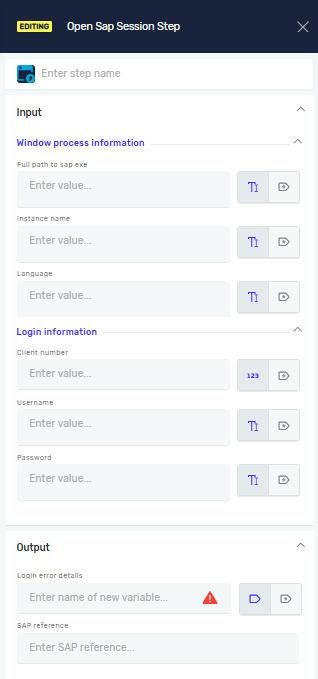
Step 2: Configure Input Parameters
- In the Full path to sap exe field, type the full path to your SAP Logon program file.
- Example:
C:\Program Files (x86)\SAP\FrontEnd\SAPgui\saplogon.exe
- Example:
- In the Instance name field, type the unique name of your SAP connection.
- In the Language field, type the two-letter language code for login.
- Example:
ENfor English
- Example:
- In the Client number field, type the SAP client number.
- In the Username field, type your SAP username.
- In the Password field, type your SAP user password.
Step 3: Configure Output Parameters
- (Optional) In the Login error details field, type a variable name to save any login error information.
- In the SAP reference field, type a name for this SAP session.
- This name identifies the session for all other SAP automation steps.
Important: All other SAP automation steps must use the same SAP reference value to work with this session. If you change the SAP reference name, update it in all related steps.
Parameters Explained
Input Parameters
Step Name (Optional)
- A custom name for the process step.
- This name shows up on the step box in the editor.
Full path to sap exe (Required)
- The full file path to the SAP Logon program.
- Example:
C:\Program Files (x86)\SAP\FrontEnd\SAPgui\saplogon.exe
Instance name (Required)
- The unique name of the SAP system you want to connect to.
Language (Required)
- The language code to use during login.
- Example:
EN(English),DE(German)
Client number (Required)
- The specific SAP client number for the login.
Username (Required)
- The SAP username for logging in.
Password (Required)
- The password for the SAP user.
Output Parameters
Login error details (Optional)
- A variable that saves any error messages if the login fails.
SAP reference (Required)
- A unique name for the opened SAP session.
- Use this reference in other SAP steps to link them to this session.
Related Articles
Need Help?
Can't find what you're looking for? Join the Robotiq Community to get help from other users and the Robotiq team.