Close Web Browser Step
The Close Web Browser step closes an open web browser window. You use it to end web automation tasks and free up system resources.
How to Use the Close Web Browser Step
Add this step to your process when you need to close a browser that was opened by an Open Web Browser Step.
Step 1: Add the Close Web Browser Step
- Drag and drop the Close Web Browser step into your process flow.
Step 2: Configure the Step
- Select the Close Web Browser step in your process.
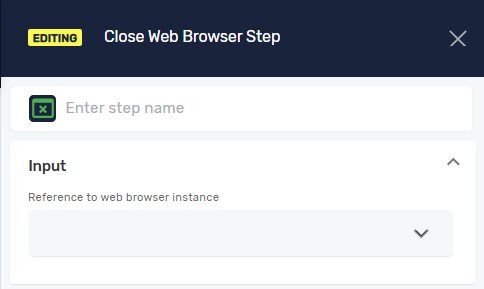
- In the properties panel, enter the required parameters.
Parameters Explained
Step Name (Optional)
- A custom name for the process step. This name appears on the step box in the editor.
- Example:
Close Chrome Browser
Driver Reference (Required)
- The name of the variable that holds the reference to the web browser driver you want to close. This variable is usually created by an Open Web Browser Step.
- Example:
myBrowserDriver - When to use it: Always specify the driver reference to make sure the correct browser instance closes.
Related Articles
- Open Web Browser Step - Learn how to open a web browser.
- Browser Group - Understand how to work with web automation.
- Selenium driver - Find out more about setting up browser drivers.
Need Help?
Can't find what you're looking for? Join the Robotiq Community to get help from other users and the Robotiq team.