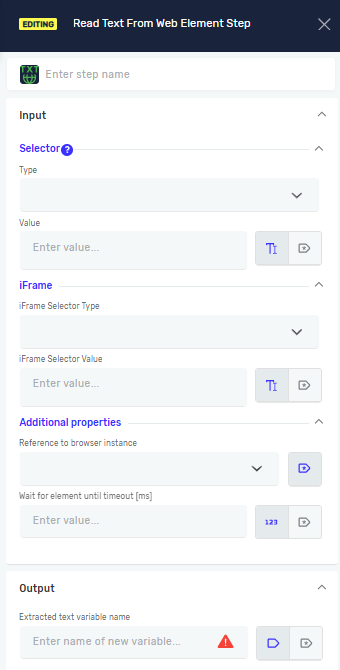
Read Text From Web Element Step
The Read Text From Web Element step grabs text from a web element. It then saves this text into a string variable. Use this step to pull information like product names, prices, or status messages from web pages.
How to Use Read Text From Web Element
Use this step to get text from a specific element on a web page.
Step 1: Add the Step
- Drag and drop the "Read Text From Web Element" step into your process.
- (Optional) Give the step a custom name in the "Step Name" field.
Step 2: Configure Input Parameters
- Selector Type: Choose how you will find the web element from the dropdown menu.
- Class Name
- CSS Selector
- Name
- Id
- Link Text
- Partial Link Text
- Tag Name
- XPath
- Selector Value: Type in the specific value for your chosen Selector Type.
- For example, if "Selector Type" is "Id", type the element's ID here.
- You can find these values by looking at the web page in your browser's inspector.
- Driver Reference: Give the variable that holds your web browser's driver instance.
- Wait for Element until timeout [ms]: Type the longest time (in milliseconds) the robot should wait for the element to show up.
Step 3: Configure Output Parameters
- Extracted attribute variable name: Type the name of the string variable where the text you pulled will be stored.
- If the variable doesn't exist, the system will make it.
Parameters Explained
Step Name (Optional)
- A custom name for the process step.
- This name shows up on the step box in the editor.
Selector Type (Required)
- Tells the robot how to find the web element.
- Options: Class Name, CSS Selector, Name, Id, Link Text, Partial Link Text, Tag Name, XPath.
Selector Value (Required)
- The specific way to identify the web element, based on the Selector Type you picked.
- Example: If
Selector TypeisId,Selector Valuecould beproduct-title.
IFrame Selector Type (Optional)
- Defines how the iframe containing the target web element is identified.
- Options:
Class Name,CSS Selector,Name,Id,Link Text,Partial Link Text,Tag Name,XPath - Select the option that best identifies the iframe you want to interact with.
IFrame Selector Value (Optional)
- Specifies the value used to locate the iframe based on the selected IFrame Selector Type.
- Example: If IFrame Selector Type is
Id, the IFrame Selector Value could bepaymentIframe. - Use this when the element you want to interact with is located inside an iframe.
Driver Reference (Required)
- The variable that holds your web browser instance.
Wait for Element until timeout [ms] (Required)
- The longest time (in milliseconds) the robot will wait for the web element to load.
- Example:
5000(for 5 seconds).
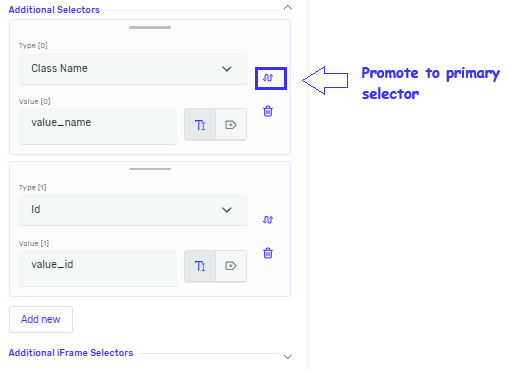
Addditional Selectors (Optional)
- List of selectors, allowing you to define multiple selectors for the same step
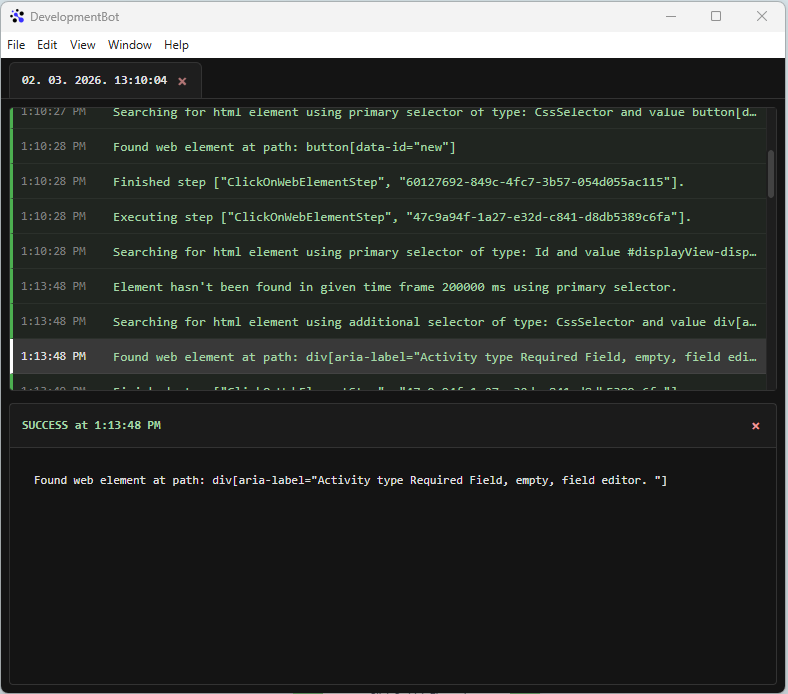
- If the primary selector fails and additional selectors are defined, the step will automatically try the additional selectors in order.
- You can add, remove, and reorder selectors at any time.
- Any selector can be promoted to the primary selector, which will swap its position with the current primary selector.
- Each selector is evaluated for the duration of the timeout defined on the step before moving on to the next one.
- If you want to promote a selector to be the primary selector, first provide all required details (selector type and value), then click the swap icon next to selector type.
The log indicates which selector was successfully resolved. If a secondary selector from the selector list is consistently matched, you may consider setting it as the primary selector.
Extracted attribute variable name (Required)
- The name of the string variable that will hold the text taken from the web element.
- Example:
productDescription
Related Articles
- Define Variable Step - Robotiq.ai Help Center
- Set Variable Value Step - Robotiq.ai Help Center
- Type Into Web Element Step
Need Help?
Can't find what you're looking for? Join the Robotiq Community to get help from other users and the Robotiq team.