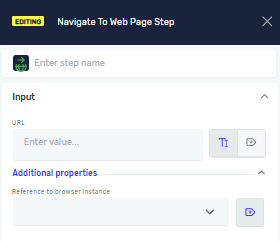
Navigate To Web Page Step
The Navigate To Web Page step opens a specific web page in a selected browser instance. Use this step when you want the robot to navigate to a URL before interacting with web elements.
How to Use the Navigate To Web Page Step
Step 1: Add the Navigate To Web Page Step
- Open your process in the Robotiq.ai editor.
- Drag the Navigate To Web Page step into your workflow.
Step 2: Enter the Web Address
- In the URL field, type the web address you want the robot to open.
Example: https://example.com
Step 3: Select Browser Instance
- In Reference to browser instance, choose the browser instance the robot should use.
- This must be an already opened browser instance created in a previous step.
Parameters Explained
Step Name (Optional)
- A custom name for the step.
- Example:
Navigate to new URL - Use this to make your steps easy to understand.
Driver Reference (Required)
- The variable that holds the web browser.
- Example:
myBrowserDriver - This links the click to a specific open browser.
Related Articles
- Type Into Web Element Step - Learn how to type text into web elements.
- Read Text From Web Element Step - Learn how to get text from web elements.
- Record process - Find out how to record your browser actions to create steps automatically.
Need Help?
Can't find what you're looking for? Join the Robotiq Community to get help from other users and the Robotiq team.