Read Web Page Url Step
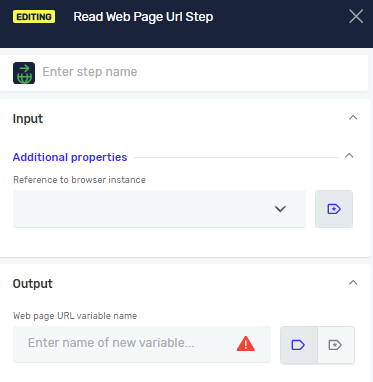
The Read Web Page URL Step retrieves the current URL of the active browser page. Use this step when you need to capture the current page address, validate navigation results, or use the URL value in further automation logic.
How to Use the Read Web Page URL Step
Step 1: Add the Read Web Page URL Step
- Open your process in the Robotiq.ai editor.
- Drag the Read Web Page URL step into your workflow.
Step 2: Select Browser Instance
1. In Reference to browser instance, choose the browser instance the robot should use.
- This must be an already opened browser instance created in a previous step.
Parameters Explained
Step Name (Optional)
- A custom name for the step.
- Example:
Read Url - Use this to make your steps easy to understand.
Driver Reference (Required)
- Input paramater
- The variable that holds the web browser.
- Example:
myBrowserDriver - This links the click to a specific open browser.
Web page URL variable (Required)
- Output paramater
- The variable that will store the URL of the currently active web page
- Example:
currentPageUrl
Related Articles
- Record process - Find out how to record your browser actions to create steps automatically.
- Browser Group - Find out how to use the Browser Group.
Need Help?
Can't find what you're looking for? Join the Robotiq Community to get help from other users and the Robotiq team.